

Appearance
Contract Templates
Create reusable contract templates that your staff can quickly attach to orders, invoices, and appointments. Templates support rich text formatting and merge tags that auto-fill with customer and order details.
Go to Settings > Contract Templates to manage them.
Template List
The list shows all your saved templates with their name, category, and active status. Click any template to edit it, or click New Template to create one.
Creating & Editing a Template
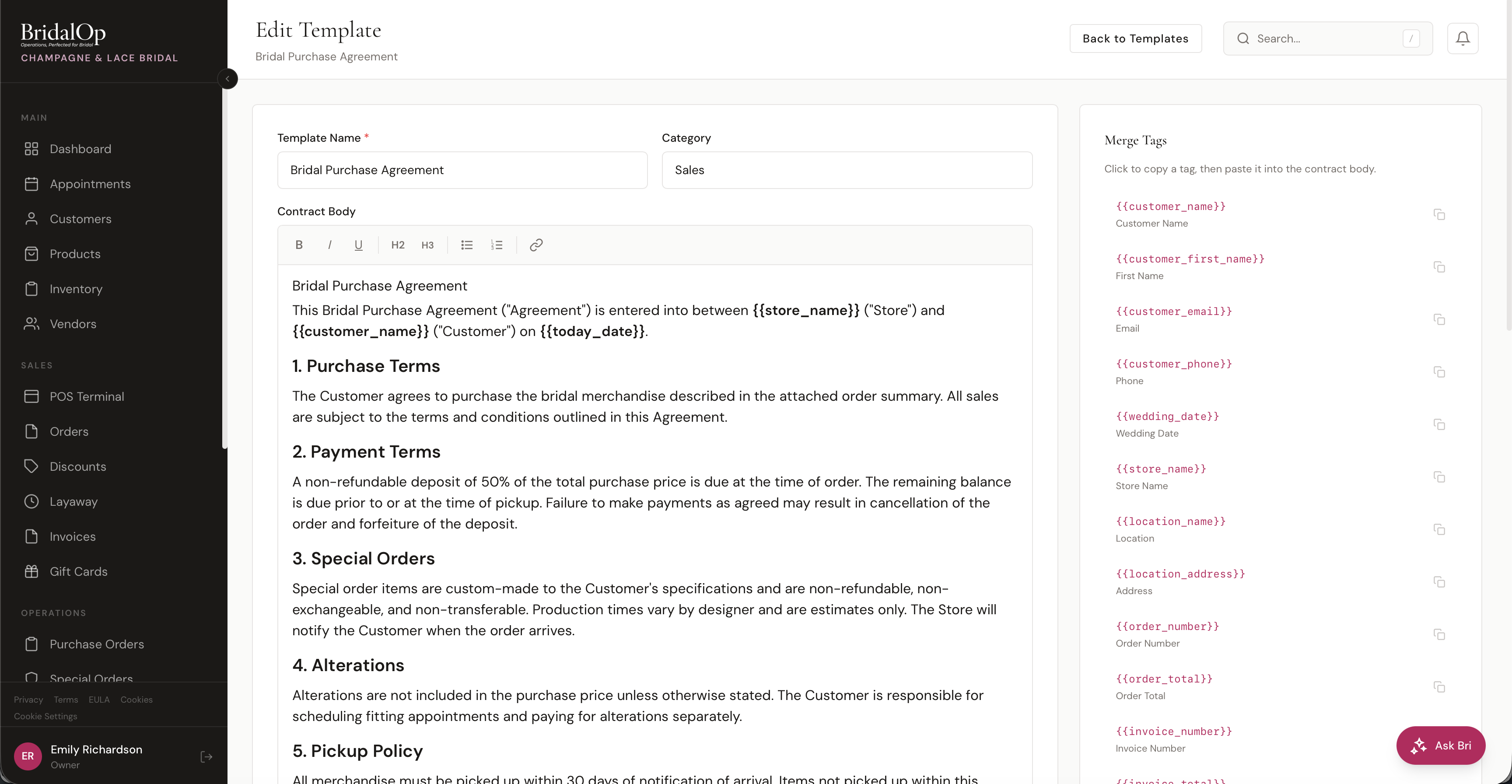
| Field | Required | Description |
|---|---|---|
| Template Name | Yes | Display name (e.g., "Bridal Purchase Agreement") |
| Category | Yes | Groups the template — Sales, Consignment, Alteration, Layaway, or Custom |
| Contract Body | Yes | The full contract text with a rich text editor (Bold, Italic, Underline, H2, H3, Bullet list, Numbered list, Link) |
Categories
Templates are organized by category to help staff find the right one quickly:
- Sales — purchase agreements, sales contracts
- Consignment — consignment intake agreements
- Alteration — alteration authorization forms
- Layaway — layaway payment plan agreements
- Custom — anything else
Merge Tags
The right sidebar shows all available merge tags. Click any tag to copy it to your clipboard, then paste it into your contract body.
When a contract is created from the template, these tags are automatically replaced with real customer and order data.
| Tag | Replaced With |
|---|---|
{{customer_name}} | Customer's full name |
{{customer_first_name}} | Customer's first name |
{{customer_email}} | Customer's email |
{{customer_phone}} | Customer's phone |
{{wedding_date}} | Wedding or event date |
{{store_name}} | Your boutique name |
{{location_name}} | Boutique location name |
{{location_address}} | Location full address |
{{order_number}} | Order number |
{{order_total}} | Order total |
{{invoice_number}} | Invoice number. On a sale contract, the order number. |
{{invoice_total}} | Invoice total. On a sale contract, the sale's total, the same as {{order_total}}. |
{{deposit_amount}} | Deposit amount. On a special-order sale, your special-order deposit percentage of the total; on a layaway, the plan's down payment; otherwise what's been paid so far. |
{{so_number}} | Special order number |
{{product_name}} | Product name. On a sale, the dress being special-ordered, or every product on the sale when nothing is. |
{{today_date}} | Today's date |
A sale contract is one tied to an order with no invoice: one attached in the POS, or one made on the Contracts tab or by an automation and linked to an order. A sale has no invoice of its own, so the invoice tags take their values from the sale.
How Templates Are Used
Once created, templates are available anywhere staff create contracts:
- Contracts > New Contract — select a template to pre-fill the title and body
- POS Terminal > Attach Contract — choose a template during checkout to attach a contract to the order
For more on how contracts work, see Contracts.