

Appearance
Commissions
Settings → Commission Rules. Requires the Commissions module, which is on by default.
Two ways to pay commission, and each person is on one of them:
| Per line | A rate applied to each sale as it happens. Can differ by product category |
| Monthly tiers | A rate decided by what they sell in a whole month |
Most shops use per line. Tiers are for when you want the rate itself to reward volume.
Per-line rates
The default. A sale is commissioned the moment it completes, at whatever rate applies, and that rate is locked onto the sale — changing a rule later never rewrites what somebody has already earned.
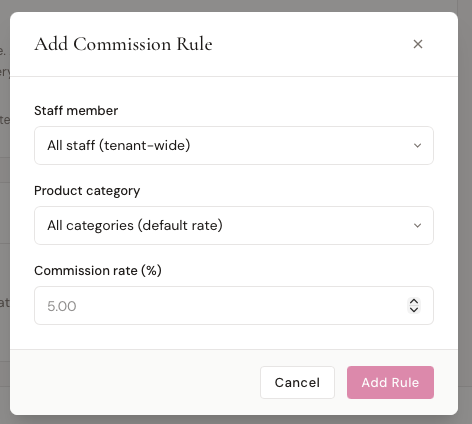
+ Add Rule creates one. Three fields:
| Field | |
|---|---|
| Staff member | One person, or All staff for a shop-wide default |
| Product category | One category, or All categories |
| Commission rate % | 0–100 |
Which rule wins
Most specific first:
- That person, that category
- That person, any category
- All staff, that category
- The Commission Rate % on their staff profile
- Nothing — 0%
So you can set 3% shop-wide, give one consultant 4%, and pay 1% on accessories for everyone, all at once.
What's commissioned
The line total, after any discount and before tax. Most boutiques don't pay commission on sales tax, so BridalOp doesn't.
A fully refunded order voids its commission — the consultant loses the credit.
Monthly tiers
Pay somebody a rate decided by what they sell in a month rather than by what they sold.
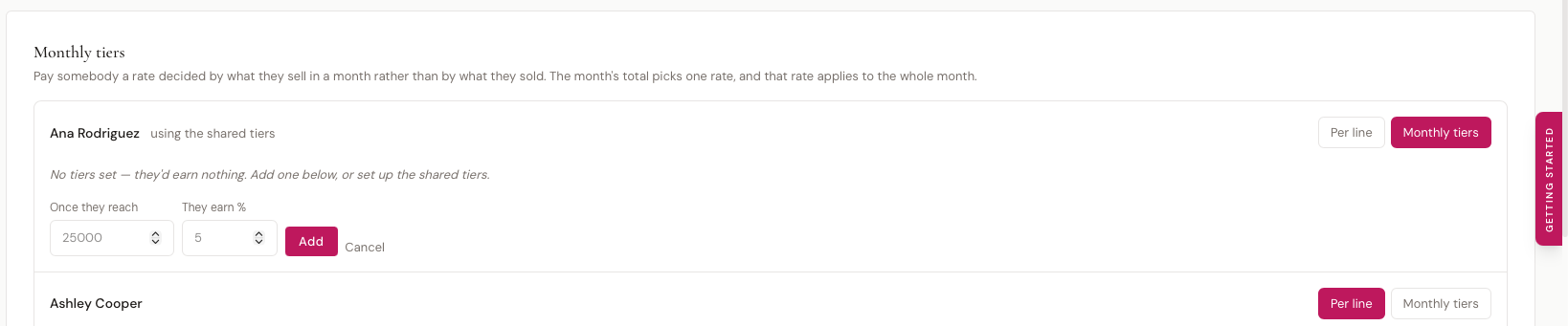
Switch anyone between Per line and Monthly tiers on the row with their name.
Their old rules aren't deleted
Moving somebody to tiers hides their per-line rules rather than removing them. Move them back and everything is as it was.
How a tier is chosen
The month's total picks one rate, and that rate applies to the whole month.
With 0% under $10,000, 2% at $10,000, and 5% at $25,000:
| Their month | Rate | They earn |
|---|---|---|
| $8,000 | 0% | $0 |
| $15,000 | 2% | $300 — 2% of all $15,000 |
| $30,000 | 5% | $1,500 — 5% of all $30,000 |
Not 5% of the part above $25,000 — 5% of everything.
This creates a cliff, on purpose
At $24,999 they earn $499.98. At $25,000 they earn $1,250. One dollar of sales is worth $750.
That is how threshold pay works, and for a lot of shops the jump is exactly the point. But it's worth knowing what it does:
- Somebody just under a threshold at month end has enormous reason to push a sale over — including by discounting, since a discounted sale still counts toward the total
- Somebody just over has reason to hold a sale back for next month
- A refund that drops them back under costs the whole jump, not just the refunded amount
BridalOp shows you the cliff in your own numbers on this page as you set the tiers up, so it's never a surprise on a payslip.
Setting tiers up
Each person on tiers can have their own tiers, or fall back to the shared tiers at the bottom of the section.
| Once they reach | The monthly total that unlocks this rate |
| They earn % | The rate, applied to the whole month |
You don't need a row for the bottom band — below your lowest threshold, commission is nothing, which is what "no commission up to X" means anyway. Adding a $0 row at 0% is harmless if it reads more clearly to you.
You can have as many tiers as you like. Three is common; two works.
Shared tiers
Set the shared tiers once and most of your team can use them. Only give somebody their own when their deal genuinely differs — the moment they have one tier of their own, they stop using the shared table entirely.
When a sale is refunded
Only affects people on monthly tiers, and only appears once somebody is on them.
| Option | |
|---|---|
| Take it off the month it was refunded in (default) | Nothing already paid is revisited. Easiest to explain on a payslip |
| Take it off the month it was sold in | More accurate, but can change a figure you have already paid |
| Leave commission alone | Paid is paid |
The default avoids the worst case: with a cliff, reaching back into a closed month can take hundreds off somebody weeks after they were paid for the sale.
Closing a month
Commission Settlements, linked from the bottom of the Commission Rules page.
Only people on monthly tiers appear here. Per-line commission doesn't need closing — it's already locked onto each sale.
Each row shows their sales, refunds, what that counts as, the rate it earned, and the commission. If they haven't reached their next tier, it tells you how far away they are.
| Action | |
|---|---|
| Settle | Closes that person's month. The figure stops recalculating |
| Settle all | The same for everyone still outstanding |
You can't settle a month that hasn't finished
A tier is decided by the month's total, so it isn't decided until the month is over. The current month shows as provisional and will move.
Settled means settled
Once a month is settled, that figure is what went to payroll. A late sale, a refund, or a changed tier won't alter it.
Reopening a settled month is possible if you need to correct something — but it recalculates from today's data, which may not match what you actually paid. BridalOp warns you when you do it.
Where commission shows up
| Staff profile | What that person has earned |
| Reports → Commissions | Per-line commission across the team |
| Commission Settlements | Monthly tier figures, and closing the month |
Things worth knowing
A person is on one plan or the other. Per-line rates and monthly tiers answer different questions, and mixing them would produce a number nobody could explain. Somebody on tiers earns nothing per line — all of their commission comes from the monthly settlement.
Tiers are per month, whatever your payroll run. If you pay weekly, tier commission still lands once a month, on whichever run follows the month closing.
Discounts count toward a threshold. A sale discounted to close still counts at what the customer paid. Worth watching the Discounts report if you run tiers with a steep jump.
See also
- Staff — profiles and the per-person default rate
- Reports — the commission report
- Sales Goals — monthly targets, which are separate from commission