

Appearance
Tux Rentals
The party is the second sale sitting in the same room as the bride.
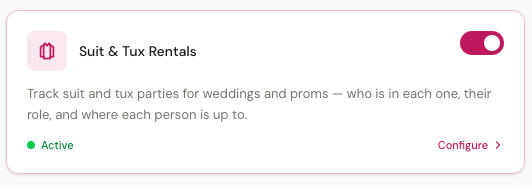
Suit & Tux Rentals tracks a whole wedding party — who's in it, what each man is wearing, what he measures, when it's due back, and what he owes. It is switched off by default; turn it on under Settings → Modules.
Gowns-only boutiques
Leave it off. Nothing appears anywhere in BridalOp until you switch it on.
The problem it solves
Three weeks before the wedding, six of nine are measured, and nobody notices until the vendor's deadline has passed.
That is the failure this module exists to catch. Everything else it does — looks, sizes, returns, late fees — matters less than telling you, while there is still time, that a party isn't ready.
What it's built for
Vendor-fulfilled rentals. You measure the party, submit it to your formalwear supplier, the boxes arrive about a week out, everyone tries on, wears it, and brings it back. You hold no stock of your own.
If you own a rack of suits and hire them out yourself, that is a different business and this doesn't cover it yet — see What isn't here yet.
The board
Tux Rentals in the main menu. This is the module's home page, and it answers one question: what needs doing today.
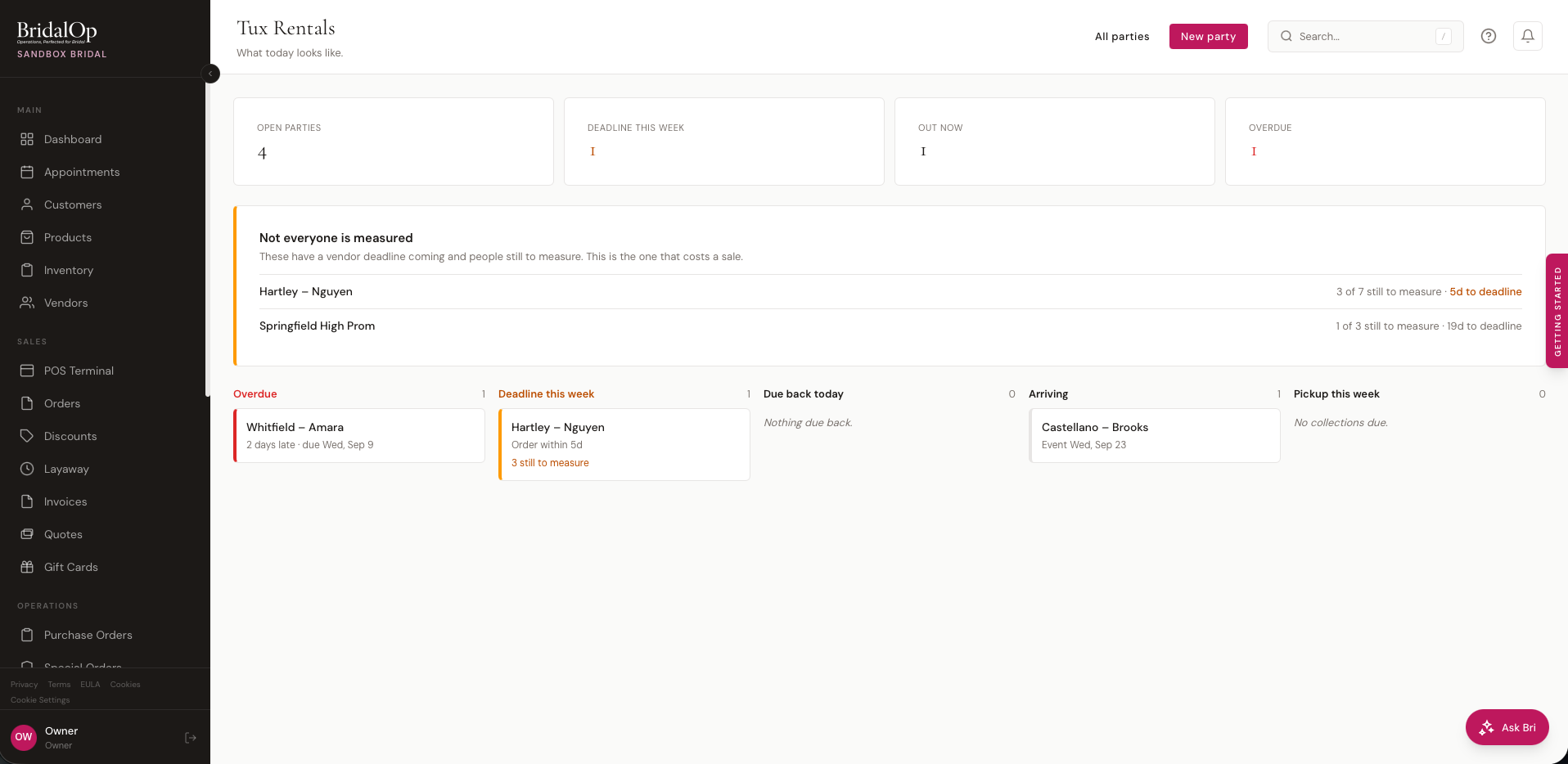
Four counts across the top — open parties, deadlines this week, garments out now, anything overdue — then the panel that matters most:
Not everyone is measured — these have a vendor deadline coming and people still to measure. This is the one that costs a sale.
Below that, a column for each thing a day can throw at you: Overdue, Deadline this week, Due back today, Arriving, Pickup this week. Nothing here is a flag somebody has to remember to set. A party is overdue because its return date has passed and the suits are still out.
All parties takes you to the full searchable list.
A party
A party is one wedding or prom and everyone renting for it.
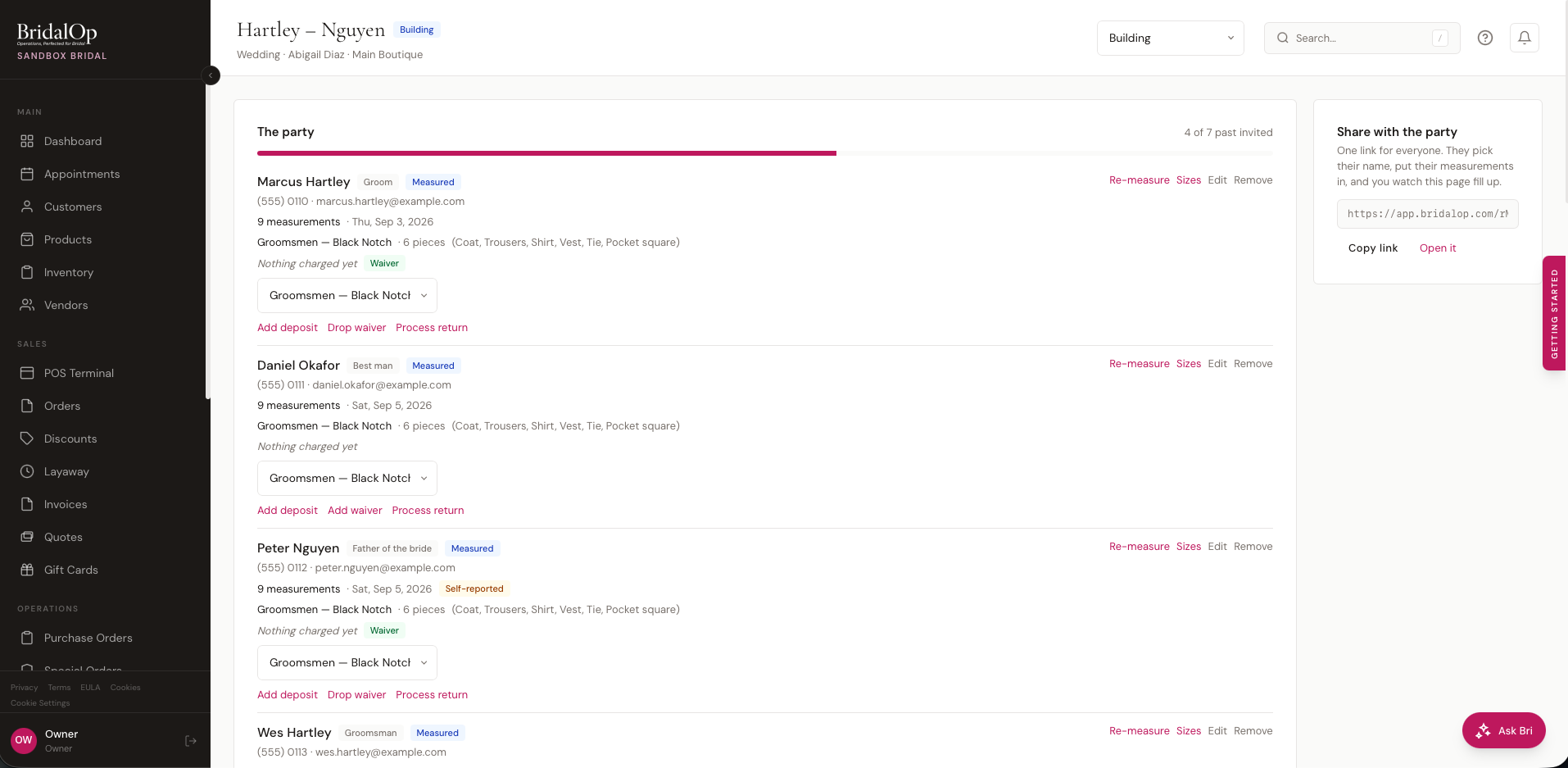
Down the left is the roster — everyone in the party, what they've done, and what they owe. Each person shows:
| Role | Groom, Best man, Father of the bride, Ring bearer, and so on |
| Status | Invited → Measured → Ordered → Arrived → Fitted → Picked up → Returned |
| Measurements | How many are recorded, when they were taken, and where they came from |
| Look | Which look he's wearing and how many pieces that comes to |
| Money | What he's paid of what he owes |
The bar across the top is the party's progress — how many have got past Invited.
Roles
Roles are a wedding idea. A prom party leaves them blank rather than carrying a label nobody can act on.
Adding someone
Give a name and, if you have them, a phone or email. A phone or an email creates his customer record, which is the point: two years later he's the one getting married, and his measurements are already on file.
Someone with only a name stays on the party without cluttering your customer list.
Looks
A gown is one item. A tux is a composition — coat, trousers, shirt, vest, tie — and what the couple actually chooses is the whole look.
Build the look once, then dress the party from it. One party can carry several: the groom in something different, the dads in something quieter.
Each row in a look is a piece type with a product and a colour against it. The product dropdown only offers products of that type — the Coat row only lists coats — so a gown can never land on a groomsman.
What makes a product available here
A product appears in these dropdowns when it has a Rental piece type set on its product page, under the Tux Rentals section, and is active. Nothing else is offered.
Assigning a look to someone generates his garments from it. Change the look afterwards and nobody is quietly rewritten — you get a Re-apply to N button, and it tells you who it couldn't touch.
Pricing a look
A look can carry one price, or several. Tux shops price the outfit rather than the garment, and what a man pays depends on how much of it he takes:
| Complete outfit | $249 |
| Coat and trousers | $200 |
| Coat only | $168 |
+ Add a price on a look sets one up: a name, the amount, and which of the look's pieces it covers. Each person in the party then picks a price on his own row. Anything he takes beyond what his price covers is charged on top at its own rate.
A look with no prices set keeps its single package price and behaves exactly as before.
Measurements
Measure on anyone in the party. Men's and boys' field sets, because ring bearers run a different scale entirely.
Measurements are versioned, never overwritten. Re-measuring keeps the old set. A boy measured in February is a different size in June, and "did we measure him wrong, or did he grow?" is a question an overwrite destroys the evidence for.
Where the numbers came from
Every set records its source, and they aren't equally trustworthy:
| Source | |
|---|---|
| Measured in store | Yours |
| Measured at another shop | A partner shop in the vendor's network |
| Measured elsewhere, sent in | A tailor somewhere, emailed over |
| Self-reported | He did it himself — flagged on the party |
Self-reported numbers are the ones that produce a coat that doesn't fit on the Friday. They carry a visible badge so you know which three of the nine to double-check before the order goes in.
Anything older than your staleness threshold is badged too.
The men's set covers neck, sleeve, chest, overarm, waist, hips, belly, outseam, inseam, height, weight, shoe size and width. Belly is taken over the stomach at its fullest rather than at the waist — it's what decides a portly cut, and without it you order a coat that buttons on paper and not on the man.
Onto the customer record
When a party member has a customer record, his measurements are copied onto it. That is how the shop finds him again — the same fields your bridal customers already use.
Sizes
Sizes on anyone who has been measured.
BridalOp suggests a size for each piece and shows its working:
Overarm 49″ − 7 = 42″, to nearest even = 42 Height 5′10″ → Regular (R)
Your vendor's own size chart always wins when you've entered one — coat length breaks differ between houses. Without one, BridalOp falls back to the standard trade derivations and says so.
Three numbers are kept, not one: what was measured, what was suggested, and what you actually ordered. Ordering something other than the suggestion is completely normal — the person holding the tape knows things a chart doesn't — but it asks you to say why, so that next February somebody can see it was a decision.
When a coat turns up three sizes too big, the only question anybody asks is which of those three was wrong. This is how you answer it.
A size is not always one number
A coat is 46R and fits in a single box. Nothing else does. The right fields appear for whatever garment you're on:
| Piece | |
|---|---|
| Coat | Chest and length |
| Trousers | Waist and outseam |
| Shirt | Neck and sleeve |
| Shoes | Size and width |
| Vest, tie, everything else | One box |
Typing "36 x 41" into a single field means nothing downstream can read it back, so the vendor order carries a note instead of a number.
Fit check
Once the boxes arrive, each piece takes a result: Fits, Too big, Too small, Wrong item, or Damaged on arrival. Anything but a pass needs somebody that day — a replacement has to be overnighted.
The party link
One link the couple shares with everyone renting.
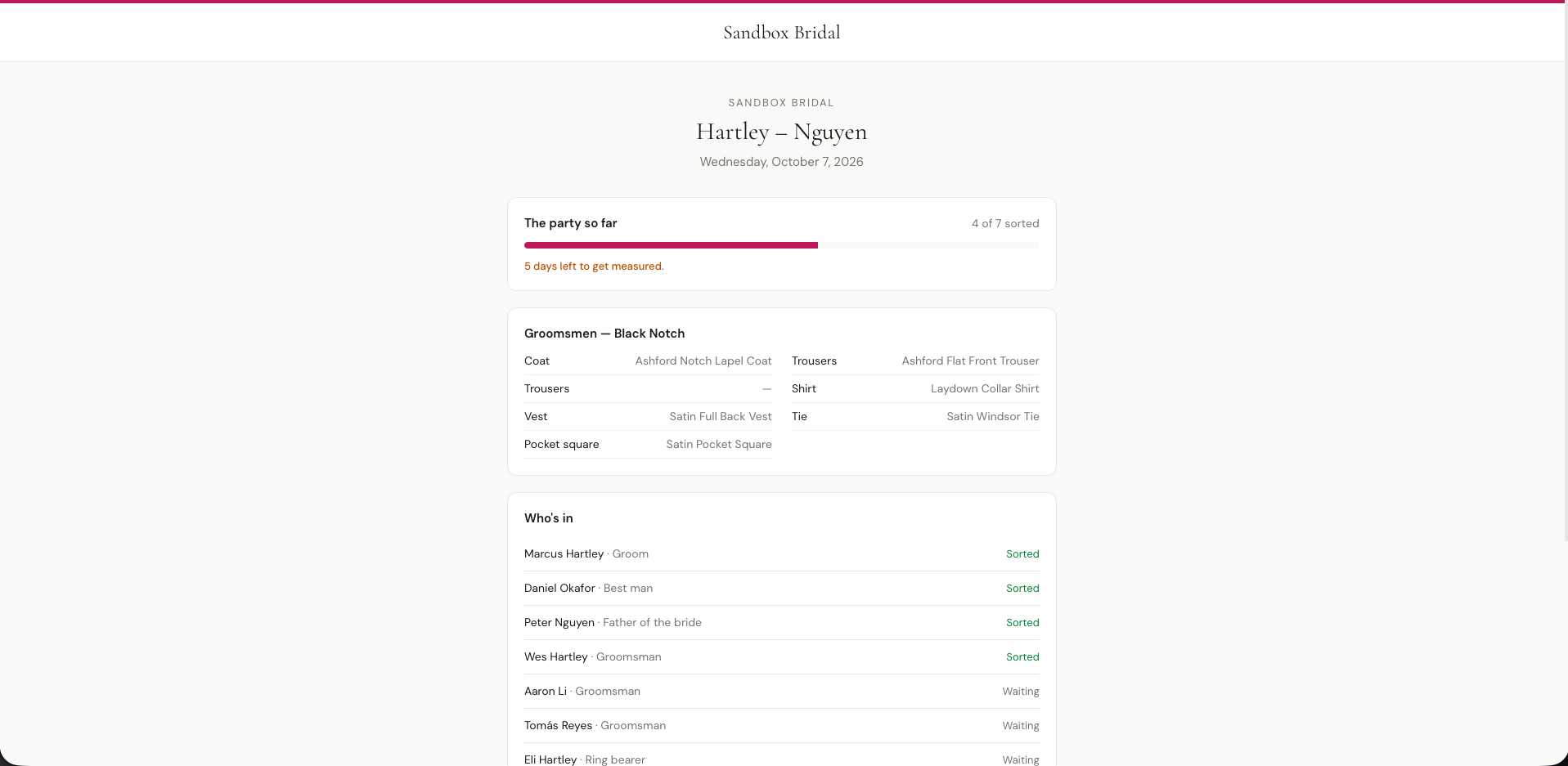
They text it to the party. Each person opens it on a phone, picks their name off the roster, and puts their own measurements in. You watch the party fill up instead of ringing eight people.
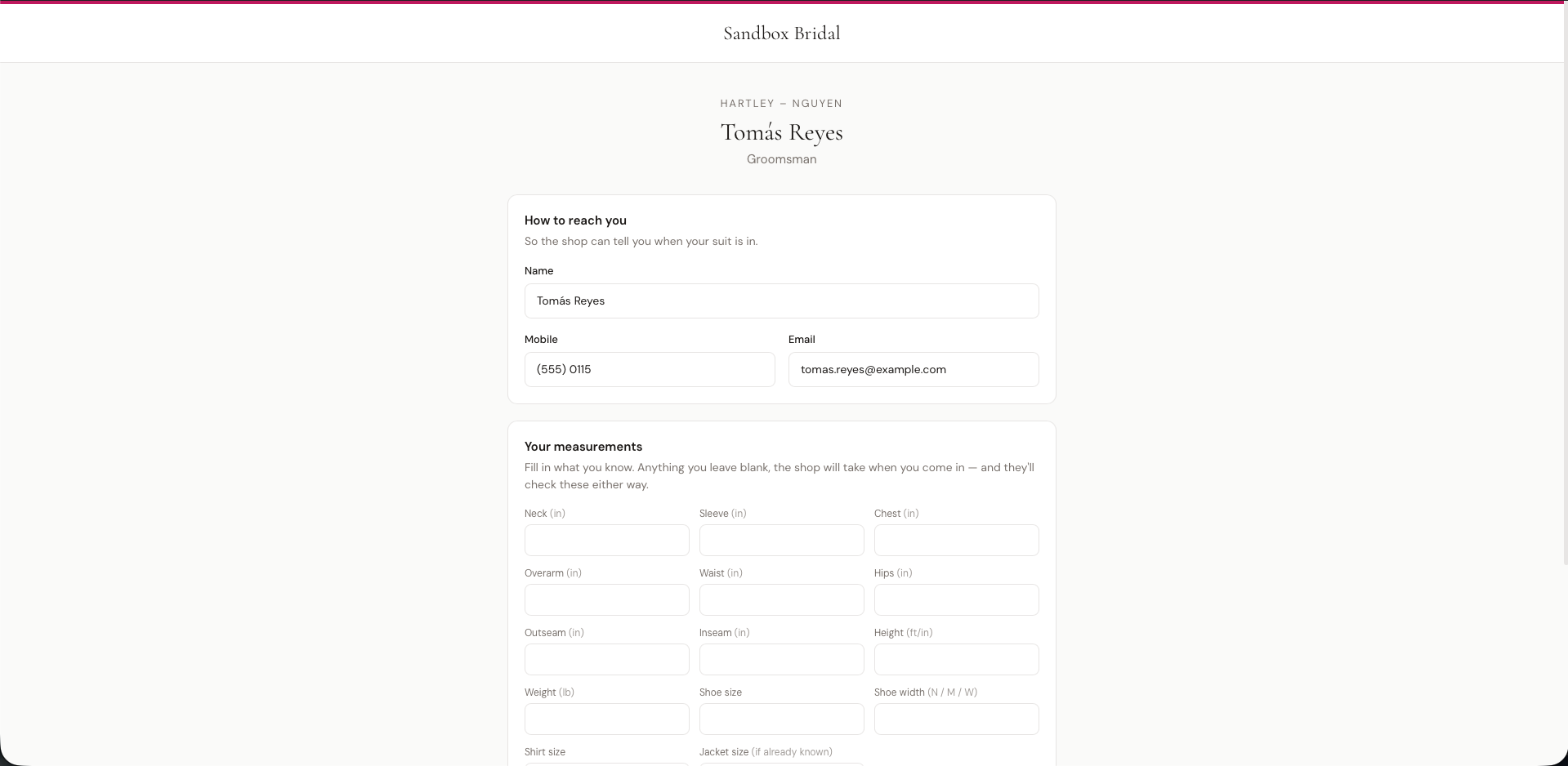
Copy link on the party page gets you the link.
What everyone with the link can see
The link is meant to be forwarded, so the shared page shows only the look, the date, and a roster of names and how far along each person is. Measurements, contact details and money sit behind each person's own private page, which only they can reach.
Anything entered through the link is saved as self-reported and stays flagged on your side.
The link keeps working after the wedding, after the party closes, and even if you switch the module off — it just explains what happened and gives your phone number, rather than showing a dead page to somebody's groomsman.
Money
Everything a party owes goes onto an ordinary order and is taken at the till like anything else. There is no separate rental payment system to reconcile.
| Deposit | Added per person, at the amount in your settings |
| Damage waiver | Optional, per person — see below |
| Return charges | Whatever didn't come back |
| Late fee | Worked out for you; charged only when you say so |
The damage waiver
Whether someone took the waiver decides whether he can be charged for damage at all, so it sits on the person rather than as a line item somebody forgets to add. The return screen reads it directly.
Returns
Process return on anyone. Every piece he had, ticked by default — you untick what didn't come back.
The vest, the tie and the studs are the ones that go missing, and your supplier bills you for each one. Unticked pieces become a charge at that piece's replacement price. Damaged pieces only propose a charge when the person didn't take the waiver.
Nothing is charged until you confirm it. Recording what's missing and billing for it are separate permissions: a consultant can write down that a vest is gone, and deciding to bill for it is somebody else's call.
Somebody stays open until everything of his is back. One missing tie keeps him on your list, which is the point.
Late returns
Nothing in this module ever charges a card on its own.
A late party is flagged on the board with the amount worked out — from the adjusted return date, so nobody is billed for a day you were closed — and someone presses the button to add it to that person's order.
The group promo
"Groom's tux free with five paid rentals." Switch it on in settings with your own threshold.
It is worked out when the party is ordered and locked there. If somebody drops out afterwards, you're told — "applied at 5 paid, now 4" — and nobody is re-billed. Charging the groom for a tux he was told was free is not a conversation anybody wants.
Dates
Every party carries the dates that matter, worked out from your settings when you create it and changeable any time:
| Order by | Your vendor's deadline. The one that loses the sale |
| In store by | When the boxes should have landed |
| Pickup | Moved back to a day you're actually open |
| Due back | Added to the event date, then moved forward to a day you're open |
Pickup and due-back respect your opening days and holiday closures. A Saturday wedding when you're shut Sunday and Monday comes back Tuesday. A Thursday wedding comes back Friday. Nothing assumes weddings are on Saturdays.
Change a date by hand and it stays changed — recalculating never overwrites something you decided.
Scanning the box
Scan the box on a party. Two passes — one when the delivery lands, one when it goes back.
Checking in
Scan each garment as you unpack it. The barcode is recorded against that man's piece, and the screen fills in as you go.
- Scanning the same thing twice is refused by name — "Already scanned in against Michael's coat" — because a handheld firing twice is the ordinary way a scanner fails
- A barcode nothing on the party claims asks you which piece it is, rather than guessing
Packing to return
The same list in reverse. Scan each piece as it goes into the return box, and before you seal it the screen tells you what isn't in there:
2 pieces not in the box. Michael R — trousers 37R. Sam O — tie Y32A.
Don't seal it yet.
It turns green once everything that arrived is back.
This is the point of the whole thing. Your vendor rebills weekly for anything they haven't had returned, so a vest still hanging in the back costs money every week until somebody notices — and the only moment anybody would notice is while the box is still open.
Chain of custody
Both passes record the actual barcode. Vendors occasionally send a garment under another garment's number — the sheet says the red tie is 943123 and the tag on the tie says 856321 — and a shop that scanned both ends can show it returned exactly what it was sent.
What it checks against
Scanning works from the party you've already entered, not from your vendor's manifest. So it catches anything that came in and didn't go back, and a piece that never arrived reads as Not arrived rather than missing — those are different conversations with your supplier.
Reading the vendor's own manifest in is a separate piece of work still to come.
Appointments
Switching the module on creates three appointment types: Tux Measuring, Tux Fit Check and Tux Pickup. They're staff-booked rather than offered on your public booking page, and they keep tux work legible in a diary that also has gown appointments in it.
Automations and messages
Eleven triggers become available under Automations once the module is on, including:
- Rental party not fully measured — N days before the deadline with somebody still unmeasured. The one worth setting up first
- Rental order deadline approaching
- Rental due back soon and Rental overdue
- Fit check failed
Seven message templates sit under Tux Rentals in Email & SMS Templates, including the party invite that carries the link.
Reports
Reports → Tux Rentals answers four things at once:
| Revenue | What rentals brought in, with weddings and prom split out |
| Still out | Every garment not yet back, and what you'd be billed if none came back. Ignores the date range — this is about right now |
| Recovery | What you charged for late and missing pieces |
| Vendor volume | What went to whom, for when you negotiate terms |
The recovery section flags pieces marked as never returned with no charge raised. That's usually the return checklist being ticked straight through on a busy Saturday — and your supplier still bills you for them.
What isn't here yet
- Renting from your own stock. Everything here assumes your supplier ships and takes back the garments. Own-stock hire needs a reservation calendar, and that's a later release.
- Ordering direct to your vendor. Print or email the party sheet and key it into their portal.
- Taking the deposit through the party link. Members see what they owe; payment happens at the shop.
- Reading the vendor's manifest in. Scanning works from the party you've entered, so it can't yet tell "the vendor never sent it" apart from "we never entered it".
- A card on file for damages. Fees are worked out for you; taking the money is still done by hand.
- Selling suits. Rental only, for now.
See also
- Tux Rental Settings — the judgement calls, made once
- Setting Up Tux Rentals — end to end, first party included
- Modules — switching it on and off